Out-of-Hours Call Handling: Complete 2025 Guide for Small Businesses
What is out-of-hours call handling?
Out-of-hours call handling answers and routes business calls outside normal hours—via on-call staff, live services, or AI assistants—preventing lost leads and addressing urgent issues. (US: “after-hours answering service.”)
Table of Contents
- • Executive Summary: Transform Your Call Management
- • Why Out-of-Hours Call Handling Matters
- • Your Call Handling Options Compared
- • Step-by-Step Setup Guide
- • How AI Call Assistant Works
- • Industry-Specific Solutions
- • Real Customer Success Stories
- • Pricing & ROI Calculator
- • Frequently Asked Questions
Executive Summary: Transform Your Call Management
Every missed call after business hours costs money. Whether you’re a contractor getting emergency repair requests or a dental practice with patients calling about urgent issues, you can’t afford to lose leads when unavailable. This guide covers out-of-hours call handling (known as after-hours answering service in the US) solutions that capture every opportunity.
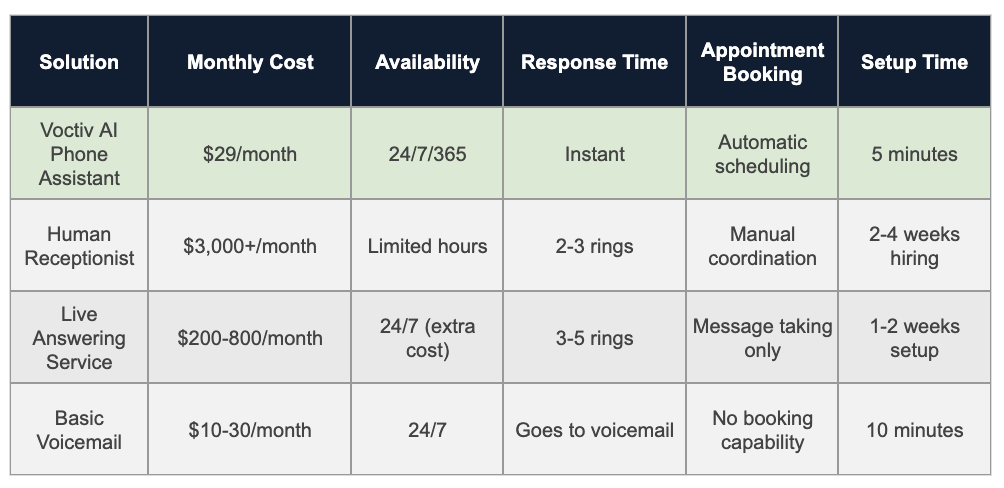
Sources & Assumptions: Pricing based on industry averages as of 2025. Setup times reflect typical implementation processes.
AI Phone Assistant Advantages:
- Handles 100% of calls with zero missed opportunities
- Books appointments directly into your calendar
- Blocks spam calls automatically
- Works in multiple languages
- Costs 99% less than hiring a receptionist
Ready to see how this works for your business? Let’s explore the complete setup guide below.
For individuals and small teams (up to 5 persons) – mobile app solution:
Why Out-of-Hours Call Handling Matters for Small Businesses in 2025
Your competitors answer their phones. That’s today’s harsh reality. When customers need something urgently—whether it’s a plumbing emergency at 11 PM or a last-minute appointment cancellation—they’re calling multiple businesses until someone picks up.
Studies show 67% of customers won’t leave voicemail, and 85% will call a competitor if you don’t answer within 3 rings. For small businesses, every missed after-hours call potentially means:
- $150-$500 in lost revenue per call (depending on your industry)
- A customer who becomes a competitor’s client permanently
- Negative word-of-mouth from frustrated potential customers
- Reduced search rankings if customers can’t reach you easily
Your After-Hours Call Handling Options Compared
Let’s break down realistic options for handling calls when you’re unavailable, including costs and revenue impact:
Option 1: Do Nothing (Voicemail Only)
How it works: Calls go straight to voicemail after hours. You check messages next business day.
Cost: $10-30/month
Pros:
- Cheapest option available
- Zero setup complexity
- No training required
Cons:
- 80-90% of callers won’t leave messages
- Lost opportunities go straight to competitors
- No appointment booking capability
- Urgent issues remain unaddressed
Revenue impact: With 20 after-hours calls monthly at $200 average value, you’re potentially losing $3,200-$3,600 monthly in revenue.
Option 2: On-Call Rotation (Staff-Based)
How it works: Team members take turns being on-call, typically using call forwarding to personal phones.
Cost: $500-1,500/month (overtime pay, burnout risk)
Pros:
- Human interaction with familiar staff
- Handles complex questions effectively
- Direct problem resolution
Cons:
- Employee burnout and decreased morale
- Inconsistent service quality
- Overtime costs add up quickly
- Coverage gaps during vacations and sick days
Option 3: Traditional Answering Service
How it works: Third-party company answers calls using human operators following your scripts.
Cost: $200-1,200/month (varies by call volume)
Pros:
- Professional human answering
- 24/7 coverage
- Message taking and basic screening
Cons:
- Operators lack your business-specific knowledge
- Per-minute or per-call pricing gets expensive
- Limited appointment booking capabilities
- Quality varies between operators
Option 4: AI Phone Assistant (Recommended)
How it works: AI-powered system answers calls, books appointments, and handles inquiries automatically.
Cost: $29-50/month
Pros:
- 100% availability with zero burnout
- Instant response time
- Direct calendar integration
- Automatic spam filtering
- Multilingual support
- Learns your business automatically
Cons:
- May struggle with highly complex scenarios
- Some customers prefer human interaction
- Requires clear guidelines for emergency escalation
Learn more about implementing AI phone solutions for your business.
Step-by-Step Setup Guide for After-Hours Coverage
Setting up professional after-hours call handling doesn’t need to be complicated. Here’s your roadmap:
Step 1: Audit Your Current Call Situation
Before choosing a solution, understand your needs:
- How many after-hours calls do you receive weekly?
- What percentage are urgent vs. routine?
- What’s the average value per converted call?
- Do you need multilingual support?
- What appointment types need booking?
Step 2: Choose Your Solution
Match your needs to the right option:
- Under 50 calls/month: AI assistant or basic answering service
- 50-200 calls/month: AI assistant (best value)
- 200+ calls/month: AI assistant with human backup for complex cases
- Medical/legal fields: Consider compliance requirements for healthcare communication
Step 3: Configure Call Forwarding
Set up your phone system:
- Log into your business phone system
- Configure after-hours forwarding rules
- Set your business hours precisely
- Add holiday exceptions
- Test forwarding before going live
Step 4: Create Response Scripts
Your AI assistant or answering service needs clear guidelines:
- Standard greeting and business introduction
- Common questions and appropriate answers
- Appointment booking procedures
- Emergency escalation triggers
- When to send SMS notifications
Step 5: Test Everything Thoroughly
Before announcing your new service:
- Call from different phones during off-hours
- Try various scenarios (appointments, questions, emergencies)
- Verify calendar integration works correctly
- Check SMS notification delivery
- Confirm spam filtering functions properly
Step 6: Monitor and Optimize
After launching:
- Review call recordings weekly
- Track conversion rates
- Adjust scripts based on common issues
- Gather customer feedback
- Calculate actual ROI monthly
How AI Phone Assistants Handle After-Hours Calls
Modern AI phone assistants use advanced speech recognition and natural language processing to deliver human-like conversations. Here’s what happens when a customer calls:
The Call Flow Process
- Instant Answer: AI picks up immediately (no hold time)
- Natural Greeting: Professional introduction using your business name
- Intent Recognition: Understands what the caller needs
- Information Gathering: Asks relevant follow-up questions
- Action Taken: Books appointments, answers questions, or escalates
- Confirmation: Sends SMS confirmation with details
- Notification: Alerts you via text about important calls
What AI Assistants Handle Well
- Appointment scheduling and rescheduling
- Answering common business questions
- Taking detailed messages
- Providing business hours and location
- Filtering spam and sales calls
- Collecting caller information
- Confirming existing appointments
When to Escalate to Humans
AI should escalate in these scenarios:
- Genuine emergencies requiring immediate response
- Highly complex technical questions
- Customer expressing strong frustration
- Situations outside defined parameters
- Requests for pricing negotiation
Voctiv’s AI assistant can recognize these situations and immediately text you with caller details, ensuring urgent matters get appropriate attention. Explore more AI assistant features.
Industry-Specific After-Hours Solutions
Different industries have unique after-hours needs. Here’s how to tailor your solution:
Healthcare & Dental Practices
- Key needs: Emergency triage, appointment changes, new patient intake
- Best solution: AI assistant with clear emergency protocols
- Special considerations: Patient privacy requirements, clear administrative boundaries
- Average ROI: $3,500-5,000 monthly from recovered appointments
Note: Voctiv provides administrative support only and can’t handle medical emergencies or provide medical advice. Emergency calls should be directed to appropriate medical personnel.
Home Services (Plumbing, HVAC, Electrical)
- Key needs: Emergency dispatching, job booking, service area verification
- Best solution: AI assistant with emergency escalation
- Special considerations: Geographic coverage areas, emergency vs. routine classification
- Average ROI: $2,000-4,000 monthly from emergency calls alone
Legal Practices
- Key needs: Consultation scheduling, conflict checks, client screening
- Best solution: AI assistant for initial intake, attorney callback scheduling
- Special considerations: Confidentiality requirements, practice area qualification
- Average ROI: $4,000-7,000 monthly from qualified leads
Real Estate Agents
- Key needs: Showing requests, property information, buyer qualification
- Best solution: AI assistant with property database integration
- Special considerations: Multiple property listings, buyer vs. seller inquiries
- Average ROI: $3,000-6,000 monthly from showing appointments
Veterinary Clinics
- Key needs: Pet emergency assessment, appointment booking, prescription refills
- Best solution: AI assistant with emergency vet referral protocols
- Special considerations: Medical vs. administrative boundaries, after-hours emergency clinics
- Average ROI: $2,500-4,500 monthly from captured appointments
Real Customer Success Stories
Here’s how small businesses transformed their after-hours communication:
HVAC Company – Captured Emergency Calls
“We were losing 15-20 emergency calls monthly to competitors. Now AI captures every call, books appointments instantly, and texts me immediately for true emergencies. We’ve added $4,200 monthly in emergency service revenue.”
- Before: 65% missed after-hours calls
- After: 0% missed calls
- Monthly revenue increase: $4,200
- Time saved: 12 hours/week
Dental Practice – Eliminated Phone Tag
“Patients used to leave voicemails requesting appointment changes, then we’d play phone tag for days. Now AI handles everything instantly, and our no-show rate dropped significantly because patients can easily reschedule.”
- Before: 18% no-show rate
- After: 6% no-show rate
- Monthly recovered revenue: $3,400
- Patient satisfaction score: +23%
Law Firm – Qualified Leads Automatically
“AI screens potential clients, gathers case details, and books consultations while I’m in court or with clients. I only receive notifications about qualified leads, and my consultation calendar stays full.”
- Before: 40% of inquiries unqualified
- After: 85% qualified consultation rate
- Monthly new client value: $5,800
- Admin time saved: 10 hours/week
Beauty Salon – Eliminated No-Shows
“AI handles all appointment bookings and fills canceled slots instantly. My no-show rate dropped from 23% to under 5%, and I’m booking 12 more appointments monthly without lifting a finger.”
- Before: 23% no-show rate
- After: 4% no-show rate
- Monthly recovered revenue: $1,890
- Time saved: 8 hours/week
Read more customer success stories and see actual results from businesses like yours.
Pricing & ROI Calculator
Let’s calculate your potential return on investment with different solutions:
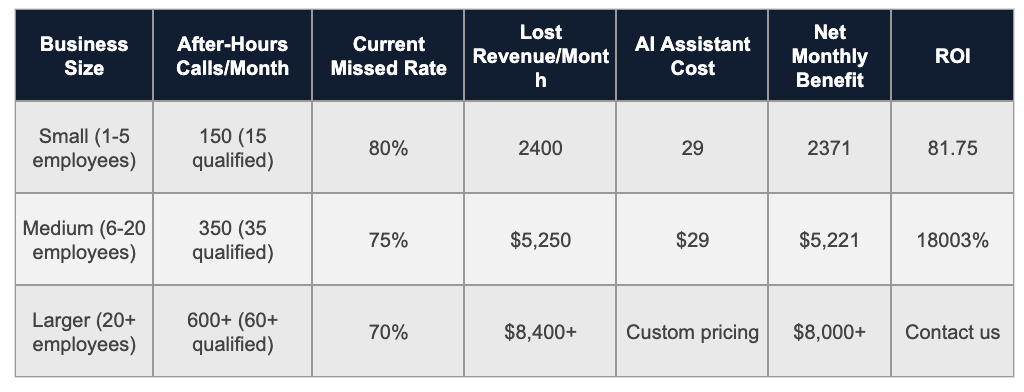
Sources & Assumptions: Example calculations based on $200 average call value and conservative industry conversion rates. Your actual results will vary by industry, location, and call quality.
Want to calculate your specific ROI? Visit our pricing calculator for personalized estimates.
Frequently Asked Questions About Out-of-Hours Call Handling
Will customers actually talk to an AI assistant?
Many customers readily engage with well-designed AI assistants, especially when they solve problems quickly. Most callers prioritize getting their appointment booked or question answered over whether they’re speaking with a human or AI. However, some customers may prefer human interaction, so consider providing options when possible.
How accurate is AI at understanding different accents and speaking styles?
Modern AI speech recognition handles most regional accents and speaking patterns reasonably well, though accuracy varies. Background noise, very strong accents, or technical terminology may occasionally cause issues. Most AI systems continue improving through machine learning.
What happens with true emergencies during out-of-hours calls?
AI assistants can be programmed to recognize emergency keywords and escalate appropriately—typically by immediately texting or calling you with caller details. However, you’ll need to clearly define what constitutes an emergency for your specific business during setup. Note that Voctiv can’t handle medical emergencies and should not be used as an emergency medical response system.
Can AI integrate with my existing calendar and booking system?
Most modern AI phone assistants integrate with popular calendar platforms like Google Calendar and many scheduling systems. They typically sync in real-time to prevent double-booking, though integration capabilities vary by provider.
What’s the difference between “out-of-hours” and “after-hours” call handling?
“Out-of-hours” is primarily British terminology, while “after-hours” is more common in American English. Both terms describe the same concept: managing business calls outside normal operating hours. The solutions and benefits are identical regardless of terminology.
How much does professional after-hours coverage typically cost?
Costs vary widely depending on the solution. Basic voicemail costs $10-30 monthly, traditional answering services range from $200-1,200 monthly, while AI assistants typically cost under $50 monthly. The key is calculating potential revenue recovery versus service costs. Learn more about Voctiv’s pricing options.
Can AI assistants provide medical advice or diagnose conditions?
No. AI phone assistants like Voctiv provide administrative support only—they can’t give medical advice, diagnose conditions, or handle medical emergencies. They’re designed for appointment scheduling, answering general business questions, and routing urgent matters to appropriate personnel. Medical questions should always be directed to qualified healthcare professionals.
Conclusion: Transform Your Business Communication
Effective out-of-hours call handling isn’t optional in today’s competitive market. Whether you choose traditional answering services or modern AI assistants, the key is ensuring no genuine opportunity slips through when you’re unavailable.
For small businesses looking to maximize ROI, AI phone assistants offer compelling advantages: 24/7 availability, automatic appointment booking, spam filtering, and costs significantly below traditional solutions. However, the best choice depends on your specific industry requirements, call volume, and customer preferences.
Start by implementing basic call forwarding, then upgrade to more sophisticated solutions as your business grows. The investment in professional after-hours answering typically pays for itself through recovered revenue within the first month.
For more guidance, explore our resource library with implementation guides and success stories. Ready to see results in action? Check out our customer success stories or start with a free trial.
About This Guide
Author: Voctiv Editorial Team – Business Communication Specialists
Reviewed by: Small Business Technology Advisory Panel
Last updated: 2025-01-02
Expertise: Over 5 years helping small businesses optimize phone communication and reduce missed opportunities through technology solutions.
Questions about implementing after-hours call handling? Contact our team for personalized guidance.