The Ultimate Guide to Property Management Call Answering Service: Boost Your Productivity and Customer Engagement
AI Call Assistant for Property Managers: Save Time and Never Miss a Lead
Executive Summary
As a US property manager, you’re juggling tenant inquiries, showings, and maintenance calls. Missing calls costs you business. Answering spam drains your time. Voctiv’s AI phone assistant changes the game—it handles every call, filters spam, and books appointments 24/7.
Users save roughly an hour daily and recover hundreds in lost leads. The system syncs with Google Calendar, screens unwanted calls, and captures prospects who reach out after hours. This guide shows you how it works.
The Pain Points Property Managers Face
Before diving into solutions, let’s name the problems you’re dealing with:
- Missed Calls from Potential Tenants: You’re showing a property or handling an emergency. A prospective tenant calls. They don’t leave a message. That’s a lost lease.
- Sales Calls and Spam: You answer the phone expecting a tenant inquiry. It’s another solar panel pitch. Your time’s too valuable for this.
- Voicemail Overload: Sifting through messages to find what’s urgent wastes precious minutes you could spend closing deals.
Key Features of Voctiv’s AI Call Assistant
Our system tackles these challenges head-on:
- Automated Appointment Scheduling: Syncs with Google Calendar. Books showings and meetings automatically. Your schedule stays current without manual updates.
- 24/7 Call Answering: Never miss a lead. The AI picks up every call, day or night.
- Business Question Handling: Common questions about properties get answered instantly. No need for you to repeat basic information.
- Spam Call Blocking: Filters out unwanted calls. You only hear from serious prospects.
- Call Transcription: Review conversations quickly. Spot urgent issues at a glance.
What Users Say About Our AI Assistant
Here’s feedback from business owners using our system—and how it applies to property management:
- “I’m a small business owner and get tons of calls I don’t want to answer. Everyone’s trying to make money off my hard-earned customers. This has given me so much time back it doesn’t have a price. Voicemail is old school; this is helpful because customers interact with it, and if they’re serious about doing business, they’ll book an appointment.” For property managers, this means focusing on genuine tenant inquiries instead of fielding spam.
- “This app’s ideal for small businesses needing a virtual assistant. It works great; the support team’s been fantastic. It has tons of potential, and I hope they keep expanding. I suggested customization based on business needs—tailoring questions and answers.” You can customize responses for tenant queries or maintenance scheduling.
- “Absolutely fantastic. It saves me so much time by making my appointments for me.” Imagine not juggling your schedule manually during peak rental seasons.
How to Set Up Your AI Call Assistant
Getting started takes less than a minute:
- Download the App: Visit ai.voctiv.com to grab the app.
- Follow Setup Instructions: The app walks you through syncing with Google Calendar and setting call preferences.
- Start Receiving Calls: Once configured, the AI answers calls, books appointments, and blocks spam while you focus on what matters.
Time Savings and Revenue Recovery
On average, users save an hour each day. That’s five hours weekly you can redirect toward property tours, tenant relations, or growing your business. The system also helps recover leads worth hundreds of dollars monthly.
Enhancing Property Management with AI Call Answering
Let’s examine how AI call answering improves operations across residential, commercial, and mixed-use properties.
Real-World Scenarios in Property Management
- Handling Tenant Inquiries Efficiently:
- Scenario: You manage an apartment complex with hundreds of units. Leasing season brings overwhelming call volume from current and prospective tenants.
- Solution: The AI handles questions about availability, pricing, and lease terms. You get more time for tours and tenant relationships.
- Scheduling Property Showings:
- Scenario: Coordinating showings for multiple properties manually becomes a logistical headache.
- Solution: Our AI integrates with Google Calendar to schedule showings automatically. No double bookings. Maximum availability.
- Emergency Maintenance Requests:
- Scenario: Tenants call with maintenance issues. Some are urgent. Others can wait. Prioritizing is tough.
- Solution: Program the AI to recognize keywords and flag emergencies. It notifies you immediately while logging non-urgent requests.
The Financial Impact
An AI call assistant saves time and delivers financial benefits:
- Reduced Overhead Costs:
- Automating call handling cuts the need for extra phone staff. That’s savings on salaries and training.
- Increased Revenue from Captured Leads:
- With 24/7 availability, you’ll never miss a lead. Prospects who call after hours get engaged and scheduled, boosting occupancy rates.
- Optimized Operations:
- Streamlined call management means efficient resource use. Redirect saved time toward property improvements and marketing.
User Testimonials
More feedback showing real-world value:
- “This has given me so much time back it doesn’t have a price. Voicemail is old school; this is helpful because customers interact with it, and if they’re serious about doing business, they’ll book an appointment.” Prospective tenants interact with the AI to book showings or ask property questions. Only serious inquiries reach you.
- “The support team has been fantastic at responding to questions or issues.” Property managers get reliable support when customizing the system for specific needs.
- “It saves me so much time by making my appointments for me.” Automated scheduling eliminates manual coordination, especially valuable during busy periods.
Key Benefits for Property Management
- Improved Tenant Experience:
- Tenants get immediate responses to inquiries. No more waiting for callbacks. This boosts satisfaction and retention.
- Enhanced Efficiency:
- Automatically scheduling showings, lease renewals, and maintenance visits saves time and prevents conflicts. You can focus on excellent service delivery.
- Data-Driven Decisions:
- Call transcriptions and analytics reveal tenant concerns and common questions. Use this data to inform property improvements and marketing strategies.
- Scalability:
- As your portfolio grows, call volume increases. The AI scales effortlessly without extra staffing costs.
Case Studies: AI in Action
Residential Property Management
Scenario: A manager overseeing a large residential complex struggled with tenant calls during leasing season.
Solution: Implementing our AI automated showing scheduling and handled common inquiries about availability and lease terms. Operations became more efficient. Tenant satisfaction improved.
Outcome: The manager saved several hours weekly, redirecting time toward tenant services and marketing. The AI also increased occupancy rates by ensuring no calls were missed.
Commercial Property Management
Scenario: A commercial manager was overwhelmed with calls from potential tenants seeking office space. Manual tour scheduling was inefficient.
Solution: The AI handled inquiries about office availability, scheduled tours, and provided lease information. It filtered spam, letting the manager focus on serious leads.
Outcome: Time spent on phone calls dropped significantly. Property tours became more efficient. Conversion rates improved. Spam filtering enhanced interaction quality.
Customizing Your AI Call Assistant
Maximize benefits through customization:
- Set Up Specific Questions and Responses:
- Customize the AI for common tenant questions. Program responses about rent prices, lease terms, and amenities.
- Prioritize Emergency Calls:
- Ensure the AI recognizes and flags emergency maintenance requests. Get immediate notifications while non-urgent issues get logged.
- Update Regularly:
- Keep the AI’s database current with property information—new listings, availability changes, and amenity updates.
- Monitor Performance:
- Review call transcriptions and performance metrics regularly. Make adjustments to maintain high service levels.
Making the Transition
Switching to AI call answering is straightforward:
- Download the App: Visit ai.voctiv.com to get started.
- Initial Setup: Follow easy instructions to integrate with Google Calendar and configure preferences.
- Customize: Tailor the AI by setting up common questions, prioritizing calls, and updating property details.
- Launch: Start using the AI to handle calls, schedule appointments, and filter spam. Focus on growing your business.
Looking Ahead: The Future of AI in Property Management
Technology keeps evolving. Here’s what’s coming:
Advanced Analytics and Reporting
Future AI assistants will offer sophisticated analytics. You’ll gain deeper insights into tenant behavior, common issues, and call patterns. These insights inform decisions about property improvements and services.
Enhanced Integration Capabilities
As property management software advances, AI will integrate more seamlessly with CRM platforms, tenant management systems, and maintenance trackers. This creates unified management processes and reduces manual data entry.
Voice Recognition and Natural Language Processing
Improvements in voice recognition mean better understanding of tenant requests. More accurate responses. Handling wider-ranging inquiries without human intervention.
Personalized Tenant Interactions
AI will personalize interactions based on previous tenant data. This means more relevant information and recommendations, leading to higher satisfaction and loyalty.
Continuous Learning and Improvement
AI systems learn and improve over time. By analyzing call data and feedback, the AI becomes more effective at handling calls and understanding needs. This ensures it remains valuable long-term.
Conclusion: Embrace the Future with AI
Property management demands efficiency, responsiveness, and personalized service. Our AI call assistant helps you meet these demands by automating call handling, scheduling, and common inquiries. You’ll get time back to focus on excellent tenant service and business growth.
By integrating our AI, you can:
- Save Time: Automate routine tasks. Spend less time on phone calls.
- Increase Revenue: Capture more leads. Convert them into tenants. Ensure higher occupancy rates.
- Improve Tenant Satisfaction: Provide prompt, accurate responses. Enhance the overall tenant experience.
Ready to transform your operations? Download the app today. Visit ai.voctiv.com to get started.
Thank you for considering our AI call assistant. We’re confident it’ll become an indispensable tool in your property management toolkit.
Out of Hours Call Handling: After Hours Answering For Small Businesses – 2025 Guide
Out-of-Hours Call Handling: Complete 2025 Guide for Small Businesses
What is out-of-hours call handling?
Out-of-hours call handling answers and routes business calls outside normal hours—via on-call staff, live services, or AI assistants—preventing lost leads and addressing urgent issues. (US: “after-hours answering service.”)
Executive Summary: Transform Your Call Management
Every missed call after business hours costs money. Whether you’re a contractor getting emergency repair requests or a dental practice with patients calling about urgent issues, you can’t afford to lose leads when unavailable. This guide covers out-of-hours call handling (known as after-hours answering service in the US) solutions that capture every opportunity.
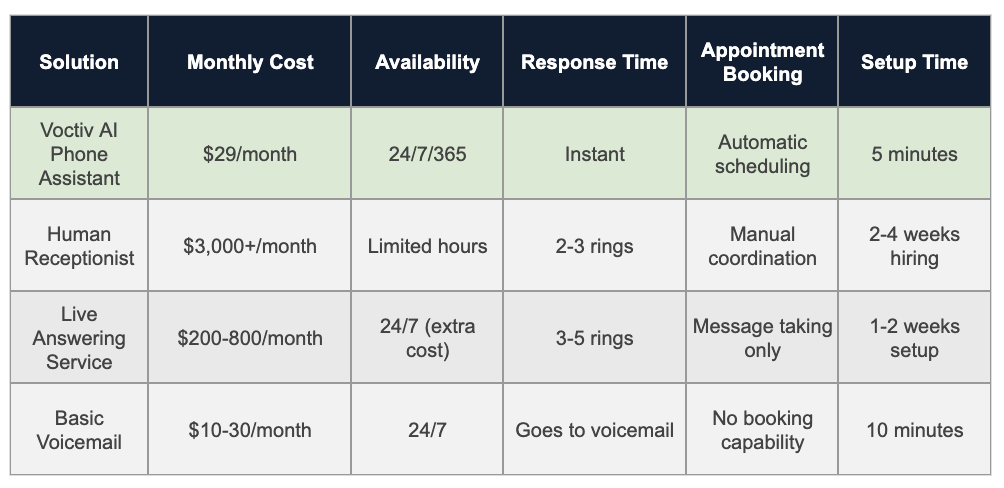
Sources & Assumptions: Pricing based on industry averages as of 2025. Setup times reflect typical implementation processes.
AI Phone Assistant Advantages:
- Handles 100% of calls with zero missed opportunities
- Books appointments directly into your calendar
- Blocks spam calls automatically
- Works in multiple languages
- Costs 99% less than hiring a receptionist
Ready to see how this works for your business? Let’s explore the complete setup guide below.
For individuals and small teams (up to 5 persons) – mobile app solution:
Try App Free
Why Out-of-Hours Call Handling Matters for Small Businesses in 2025
Your competitors answer their phones. That’s today’s harsh reality. When customers need something urgently—whether it’s a plumbing emergency at 11 PM or a last-minute appointment cancellation—they’re calling multiple businesses until someone picks up.
Studies show 67% of customers won’t leave voicemail, and 85% will call a competitor if you don’t answer within 3 rings. For small businesses, every missed after-hours call potentially means:
- $150-$500 in lost revenue per call (depending on your industry)
- A customer who becomes a competitor’s client permanently
- Negative word-of-mouth from frustrated potential customers
- Reduced search rankings if customers can’t reach you easily
Your After-Hours Call Handling Options Compared
Let’s break down realistic options for handling calls when you’re unavailable, including costs and revenue impact:
Option 1: Do Nothing (Voicemail Only)
How it works: Calls go straight to voicemail after hours. You check messages next business day.
Cost: $10-30/month
Pros:
- Cheapest option available
- Zero setup complexity
- No training required
Cons:
- 80-90% of callers won’t leave messages
- Lost opportunities go straight to competitors
- No appointment booking capability
- Urgent issues remain unaddressed
Revenue impact: With 20 after-hours calls monthly at $200 average value, you’re potentially losing $3,200-$3,600 monthly in revenue.
Option 2: On-Call Rotation (Staff-Based)
How it works: Team members take turns being on-call, typically using call forwarding to personal phones.
Cost: $500-1,500/month (overtime pay, burnout risk)
Pros:
- Human interaction with familiar staff
- Handles complex questions effectively
- Direct problem resolution
Cons:
- Employee burnout and decreased morale
- Inconsistent service quality
- Overtime costs add up quickly
- Coverage gaps during vacations and sick days
Option 3: Traditional Answering Service
How it works: Third-party company answers calls using human operators following your scripts.
Cost: $200-1,200/month (varies by call volume)
Pros:
- Professional human answering
- 24/7 coverage
- Message taking and basic screening
Cons:
- Operators lack your business-specific knowledge
- Per-minute or per-call pricing gets expensive
- Limited appointment booking capabilities
- Quality varies between operators
Option 4: AI Phone Assistant (Recommended)
How it works: AI-powered system answers calls, books appointments, and handles inquiries automatically.
Cost: $29-50/month
Pros:
- 100% availability with zero burnout
- Instant response time
- Direct calendar integration
- Automatic spam filtering
- Multilingual support
- Learns your business automatically
Cons:
- May struggle with highly complex scenarios
- Some customers prefer human interaction
- Requires clear guidelines for emergency escalation
Learn more about implementing AI phone solutions for your business.
Step-by-Step Setup Guide for After-Hours Coverage
Setting up professional after-hours call handling doesn’t need to be complicated. Here’s your roadmap:
Step 1: Audit Your Current Call Situation
Before choosing a solution, understand your needs:
- How many after-hours calls do you receive weekly?
- What percentage are urgent vs. routine?
- What’s the average value per converted call?
- Do you need multilingual support?
- What appointment types need booking?
Step 2: Choose Your Solution
Match your needs to the right option:
- Under 50 calls/month: AI assistant or basic answering service
- 50-200 calls/month: AI assistant (best value)
- 200+ calls/month: AI assistant with human backup for complex cases
- Medical/legal fields: Consider compliance requirements for healthcare communication
Step 3: Configure Call Forwarding
Set up your phone system:
- Log into your business phone system
- Configure after-hours forwarding rules
- Set your business hours precisely
- Add holiday exceptions
- Test forwarding before going live
Step 4: Create Response Scripts
Your AI assistant or answering service needs clear guidelines:
- Standard greeting and business introduction
- Common questions and appropriate answers
- Appointment booking procedures
- Emergency escalation triggers
- When to send SMS notifications
Step 5: Test Everything Thoroughly
Before announcing your new service:
- Call from different phones during off-hours
- Try various scenarios (appointments, questions, emergencies)
- Verify calendar integration works correctly
- Check SMS notification delivery
- Confirm spam filtering functions properly
Step 6: Monitor and Optimize
After launching:
- Review call recordings weekly
- Track conversion rates
- Adjust scripts based on common issues
- Gather customer feedback
- Calculate actual ROI monthly
How AI Phone Assistants Handle After-Hours Calls
Modern AI phone assistants use advanced speech recognition and natural language processing to deliver human-like conversations. Here’s what happens when a customer calls:
The Call Flow Process
- Instant Answer: AI picks up immediately (no hold time)
- Natural Greeting: Professional introduction using your business name
- Intent Recognition: Understands what the caller needs
- Information Gathering: Asks relevant follow-up questions
- Action Taken: Books appointments, answers questions, or escalates
- Confirmation: Sends SMS confirmation with details
- Notification: Alerts you via text about important calls
What AI Assistants Handle Well
- Appointment scheduling and rescheduling
- Answering common business questions
- Taking detailed messages
- Providing business hours and location
- Filtering spam and sales calls
- Collecting caller information
- Confirming existing appointments
When to Escalate to Humans
AI should escalate in these scenarios:
- Genuine emergencies requiring immediate response
- Highly complex technical questions
- Customer expressing strong frustration
- Situations outside defined parameters
- Requests for pricing negotiation
Voctiv’s AI assistant can recognize these situations and immediately text you with caller details, ensuring urgent matters get appropriate attention. Explore more AI assistant features.
Industry-Specific After-Hours Solutions
Different industries have unique after-hours needs. Here’s how to tailor your solution:
Healthcare & Dental Practices
- Key needs: Emergency triage, appointment changes, new patient intake
- Best solution: AI assistant with clear emergency protocols
- Special considerations: Patient privacy requirements, clear administrative boundaries
- Average ROI: $3,500-5,000 monthly from recovered appointments
Note: Voctiv provides administrative support only and can’t handle medical emergencies or provide medical advice. Emergency calls should be directed to appropriate medical personnel.
Home Services (Plumbing, HVAC, Electrical)
- Key needs: Emergency dispatching, job booking, service area verification
- Best solution: AI assistant with emergency escalation
- Special considerations: Geographic coverage areas, emergency vs. routine classification
- Average ROI: $2,000-4,000 monthly from emergency calls alone
Legal Practices
- Key needs: Consultation scheduling, conflict checks, client screening
- Best solution: AI assistant for initial intake, attorney callback scheduling
- Special considerations: Confidentiality requirements, practice area qualification
- Average ROI: $4,000-7,000 monthly from qualified leads
Real Estate Agents
- Key needs: Showing requests, property information, buyer qualification
- Best solution: AI assistant with property database integration
- Special considerations: Multiple property listings, buyer vs. seller inquiries
- Average ROI: $3,000-6,000 monthly from showing appointments
Veterinary Clinics
- Key needs: Pet emergency assessment, appointment booking, prescription refills
- Best solution: AI assistant with emergency vet referral protocols
- Special considerations: Medical vs. administrative boundaries, after-hours emergency clinics
- Average ROI: $2,500-4,500 monthly from captured appointments
Real Customer Success Stories
Here’s how small businesses transformed their after-hours communication:
HVAC Company – Captured Emergency Calls
“We were losing 15-20 emergency calls monthly to competitors. Now AI captures every call, books appointments instantly, and texts me immediately for true emergencies. We’ve added $4,200 monthly in emergency service revenue.”
- Before: 65% missed after-hours calls
- After: 0% missed calls
- Monthly revenue increase: $4,200
- Time saved: 12 hours/week
Dental Practice – Eliminated Phone Tag
“Patients used to leave voicemails requesting appointment changes, then we’d play phone tag for days. Now AI handles everything instantly, and our no-show rate dropped significantly because patients can easily reschedule.”
- Before: 18% no-show rate
- After: 6% no-show rate
- Monthly recovered revenue: $3,400
- Patient satisfaction score: +23%
Law Firm – Qualified Leads Automatically
“AI screens potential clients, gathers case details, and books consultations while I’m in court or with clients. I only receive notifications about qualified leads, and my consultation calendar stays full.”
- Before: 40% of inquiries unqualified
- After: 85% qualified consultation rate
- Monthly new client value: $5,800
- Admin time saved: 10 hours/week
Beauty Salon – Eliminated No-Shows
“AI handles all appointment bookings and fills canceled slots instantly. My no-show rate dropped from 23% to under 5%, and I’m booking 12 more appointments monthly without lifting a finger.”
- Before: 23% no-show rate
- After: 4% no-show rate
- Monthly recovered revenue: $1,890
- Time saved: 8 hours/week
Read more customer success stories and see actual results from businesses like yours.
Pricing & ROI Calculator
Let’s calculate your potential return on investment with different solutions:
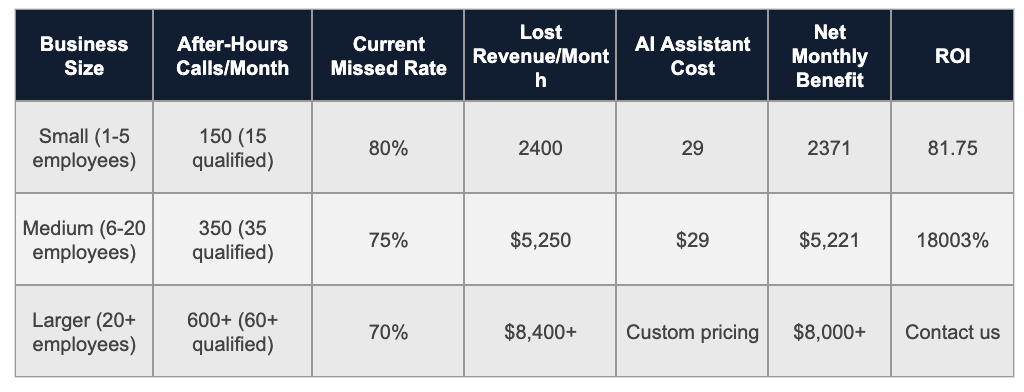
Sources & Assumptions: Example calculations based on $200 average call value and conservative industry conversion rates. Your actual results will vary by industry, location, and call quality.
Want to calculate your specific ROI? Visit our pricing calculator for personalized estimates.
Frequently Asked Questions About Out-of-Hours Call Handling
Will customers actually talk to an AI assistant?
Many customers readily engage with well-designed AI assistants, especially when they solve problems quickly. Most callers prioritize getting their appointment booked or question answered over whether they’re speaking with a human or AI. However, some customers may prefer human interaction, so consider providing options when possible.
How accurate is AI at understanding different accents and speaking styles?
Modern AI speech recognition handles most regional accents and speaking patterns reasonably well, though accuracy varies. Background noise, very strong accents, or technical terminology may occasionally cause issues. Most AI systems continue improving through machine learning.
What happens with true emergencies during out-of-hours calls?
AI assistants can be programmed to recognize emergency keywords and escalate appropriately—typically by immediately texting or calling you with caller details. However, you’ll need to clearly define what constitutes an emergency for your specific business during setup. Note that Voctiv can’t handle medical emergencies and should not be used as an emergency medical response system.
Can AI integrate with my existing calendar and booking system?
Most modern AI phone assistants integrate with popular calendar platforms like Google Calendar and many scheduling systems. They typically sync in real-time to prevent double-booking, though integration capabilities vary by provider.
What’s the difference between “out-of-hours” and “after-hours” call handling?
“Out-of-hours” is primarily British terminology, while “after-hours” is more common in American English. Both terms describe the same concept: managing business calls outside normal operating hours. The solutions and benefits are identical regardless of terminology.
How much does professional after-hours coverage typically cost?
Costs vary widely depending on the solution. Basic voicemail costs $10-30 monthly, traditional answering services range from $200-1,200 monthly, while AI assistants typically cost under $50 monthly. The key is calculating potential revenue recovery versus service costs. Learn more about Voctiv’s pricing options.
Can AI assistants provide medical advice or diagnose conditions?
No. AI phone assistants like Voctiv provide administrative support only—they can’t give medical advice, diagnose conditions, or handle medical emergencies. They’re designed for appointment scheduling, answering general business questions, and routing urgent matters to appropriate personnel. Medical questions should always be directed to qualified healthcare professionals.
Conclusion: Transform Your Business Communication
Effective out-of-hours call handling isn’t optional in today’s competitive market. Whether you choose traditional answering services or modern AI assistants, the key is ensuring no genuine opportunity slips through when you’re unavailable.
For small businesses looking to maximize ROI, AI phone assistants offer compelling advantages: 24/7 availability, automatic appointment booking, spam filtering, and costs significantly below traditional solutions. However, the best choice depends on your specific industry requirements, call volume, and customer preferences.
Start by implementing basic call forwarding, then upgrade to more sophisticated solutions as your business grows. The investment in professional after-hours answering typically pays for itself through recovered revenue within the first month.
For more guidance, explore our resource library with implementation guides and success stories. Ready to see results in action? Check out our customer success stories or start with a free trial.
About This Guide
Author: Voctiv Editorial Team – Business Communication Specialists
Reviewed by: Small Business Technology Advisory Panel
Last updated: 2025-01-02
Expertise: Over 5 years helping small businesses optimize phone communication and reduce missed opportunities through technology solutions.
Questions about implementing after-hours call handling? Contact our team for personalized guidance.
How AI Call Assistant Transforms Beauty Salon Operations
AI Call Assistant for Beauty Salons: Never Miss Another Booking Opportunity
Executive Summary
Every call that comes into your beauty salon matters. It’s a new client wanting to book, a loyal customer with questions, or an opportunity you can’t afford to miss. Yet handling these calls while running your business feels overwhelming. Voctiv AI Call Assistant changes everything—transforming how beauty salons manage calls, inquiries, and appointments while freeing up your time and boosting client satisfaction.
Key benefits for beauty salons:
- Automated Google Calendar sync – effortless appointment scheduling
- 24/7 availability – never miss a booking opportunity again
- Smart inquiry handling – answers common questions instantly
- Spam call blocking – protect your time from interruptions
- Call transcriptions – review every conversation quickly
Discover how Voctiv AI can revolutionize your salon’s communication below.
Why AI Answering Systems Transform Beauty Salon Operations
Effortless Appointment Scheduling
You’ll never juggle appointment books again. Voctiv AI Call Assistant integrates seamlessly with your Google Calendar, automatically scheduling appointments without any manual work. Clients book their slots whenever it suits them, creating a streamlined process that keeps your calendar full and your clients happy.
Round-the-Clock Availability
Missing a call often means losing business. Voctiv AI Call Assistant ensures you’re always available, answering calls 24/7. This constant availability increases your chances of securing bookings and reassures clients that their needs matter, no matter what time they call.
Smart Inquiry Handling
Answering the same questions about services, prices, or hours drains your time. Voctiv AI Call Assistant handles these inquiries intelligently, providing accurate responses every time. This saves you hours while ensuring clients get the information they need promptly and reliably.
Blocking Unwanted Spam Calls
Spam calls waste your valuable time. Voctiv AI Call Assistant blocks these calls efficiently, letting you focus on genuine client interactions. This feature is invaluable for solopreneurs who need to manage their time carefully.
Detailed Call Transcriptions
Tracking client conversations is crucial for maintaining high service standards. Voctiv AI Call Assistant provides detailed transcriptions of every call, letting you review communications quickly and identify urgent matters. This helps you stay on top of client needs and ensures nothing gets overlooked.
Key Features of Voctiv AI Call Assistant
| Feature |
Benefit |
| Automated Appointment Scheduling |
Syncs directly with Google Calendar for effortless bookings |
| 24/7 Call Handling |
Ensures you never miss a lead with round-the-clock availability |
| Standard Inquiry Responses |
Saves time by handling common questions efficiently |
| Spam Call Blocking |
Keeps your line free for important client calls |
| Call Transcriptions |
Enables quick review and management of client communications |
Real-World Impact: Stories from Beauty Professionals
Sarah’s Salon Transformation
Sarah runs a popular beauty salon but was drowning in phone calls—many from salespeople. With Voctiv AI Call Assistant, her world changed. The AI now schedules appointments, answers FAQs, and blocks spam, giving Sarah freedom to focus on her clients. “It’s like having an extra pair of hands,” she says. “Clients love the instant responses, and I love the peace of mind.”
Emily’s Solopreneur Success
As a solo beauty professional, Emily struggled to balance client treatments with incoming calls. Missing calls meant losing business. Voctiv AI Call Assistant became her lifeline, handling calls and bookings efficiently. “Now I can focus entirely on my clients,” Emily shares. “Voctiv has revolutionized my workday, making it more manageable and less stressful.”
Jessica’s Efficient Operations
Jessica was fed up with daily spam calls disrupting her salon’s workflow. After adopting Voctiv AI Call Assistant, the difference was immediate. Spam calls were filtered out, and she could devote time to real clients. “The spam-blocking feature is a game-changer,” Jessica explains. “I can work uninterrupted, and my clients appreciate the smooth booking process.”
Simplified Enterprise-Grade Technology
Voctiv AI Call Assistant isn’t just for tech-savvy professionals. This enterprise-grade technology is simplified for easy setup, requiring no special knowledge. In just a few taps, you’ll have it running, making it accessible even for the busiest salon owners.
How Voctiv AI Stands Out
What sets Voctiv AI Call Assistant apart from other systems is its user-friendly interface, robust feature set, and outstanding support. It handles a wide range of tasks efficiently, making it ideal for beauty salons aiming to streamline operations and enhance customer satisfaction. Plus, unlike traditional answering services, Voctiv learns your business automatically and never takes a day off.
Try It Now for Free
Discover the transformative power of Voctiv AI Call Assistant. Sign up today and try it for free. Experience how this innovative tool saves you time, reduces stress, and helps your beauty salon flourish.
A Night in the Life of Kristin: How Voctiv AI Call Assistant Reshaped Her Cleaning Business
How a Small Business Owner Reclaimed Her Nights with AI Call Management
Executive Summary
Late-night business calls can wreak havoc on your personal life. Kristin, a cleaning company owner in Phenix City, Alabama, transformed her operations with Voctiv AI Call Assistant—eliminating sleep disruptions while capturing every opportunity.
Key outcomes Kristin achieved:
- Zero missed calls – captured emergency jobs worth triple rates
- Family time restored – no more midnight disruptions
- Automated scheduling – seamless Google Calendar integration
- Smart call filtering – blocked spam while prioritizing real opportunities
- Morning summaries – reviewed all overnight activity over coffee
Discover how Voctiv AI helped Kristin reclaim her nights without sacrificing business growth.
The Breaking Point
Kristin faced a challenge many small business owners know too well. Her cleaning company’s growth brought increasing demands from property management clients who needed immediate service—often after midnight. These late-night emergencies were profitable but came at a steep cost.
“Every phone call after midnight felt like a gamble,” Kristin recalls. “Sure, it could be a big job, but waking up my family—especially my baby—made me question if it was worth it.” She’d tried hiring an offshore virtual assistant, but the results were disappointing. Missed calls, booking errors, and confused clients created more problems than solutions.
Finding the Right Solution
When Kristin discovered Voctiv AI Call Assistant, she was cautiously optimistic. “I was skeptical at first,” she admits. “But managing calls without lifting a finger sounded too good to pass up.”
Setup surprised her most. “It was done before I finished my coffee—just a couple of minutes. No tech expertise needed.” She programmed her AI assistant to handle calls with the same professionalism she’d use herself, syncing everything with Google Calendar for automatic scheduling.
The First Night’s Success
Results came immediately. “The first morning after setting up Voctiv, I woke up to a summary of a late-night call,” Kristin shares. “It was an emergency cleaning request for a triple-rate job. Voctiv handled everything perfectly. For the first time in months, I hadn’t lost sleep over a call.”
The AI assistant didn’t just schedule appointments—it provided concise summaries of each interaction. “It’s like having a personal assistant who never sleeps,” Kristin explains. “I just skim the summaries in the morning and know exactly what needs my attention.”
| Before Voctiv |
After Voctiv |
| Constant sleep disruptions from late-night calls |
Peaceful nights with morning summaries |
| Missed opportunities due to unavailability |
100% call capture, including triple-rate emergencies |
| Unreliable offshore assistant with frequent errors |
Consistent, professional call handling |
| Manual calendar management and scheduling conflicts |
Automatic Google Calendar sync |
| Spam calls interrupting family time |
Smart filtering that blocks spam, prioritizes real leads |
Reclaiming Work-Life Balance
With Voctiv handling all incoming calls, Kristin gained something invaluable: control over her schedule. “I pass all calls to Voctiv now,” she says. “It sifts through everything, blocking spam and lining up real opportunities. I never worry about missing out anymore.”
The impact extended beyond business operations. “My family thanks Voctiv,” Kristin laughs. “Finally, our evenings are ours again. No more jolting awake to ringing phones. Voctiv manages the chaos so we can enjoy our peace.”
During her workday, she’s more focused and present. Without constant phone interruptions, she concentrates on delivering excellent service to current clients while the AI assistant handles new inquiries and scheduling.
What’s Next for AI-Powered Business Communication
Kristin’s excited about upcoming Voctiv features. Enhanced conversational AI will enable even more natural interactions, while automated pricing capabilities will further streamline transactions for service-based businesses.
For businesses exploring AI communication solutions, the technology continues evolving to handle increasingly complex customer interactions while maintaining the personal touch clients expect.
Key Takeaways for Small Business Owners
- After-hours availability doesn’t require personal sacrifice
- AI assistants can filter spam while capturing genuine opportunities
- Quick setup (minutes, not hours) makes implementation painless
- Morning summaries provide complete oversight without constant monitoring
- Calendar integration eliminates double-booking and scheduling conflicts
Your Business Deserves Better
Kristin’s experience with Voctiv AI Call Assistant shows how technology can transform both business operations and quality of life. “Voctiv didn’t just save my business—it saved my nights,” she reflects. “Every small business owner should have this kind of support. It’s not just an investment in your business; it’s an investment in your well-being.”
Her story highlights what’s possible when small businesses leverage intelligent automation. The right tools don’t replace the personal touch—they amplify it by freeing owners to focus on what matters most.
If Kristin’s journey resonates with you, explore what Voctiv AI Call Assistant can do for your business. Learn more about pricing and plans designed for small business owners who refuse to choose between growth and work-life balance.
AI Answering Service vs. Office Receptionists and Answering Services: Transforming Small Business Communications
AI Call Assistant vs Office Receptionist vs Answering Service: Which Is Best for Your Small Business?
Executive Summary
Missed calls cost small businesses thousands in lost revenue annually. This guide compares three call management solutions—office receptionists, traditional answering services, and AI assistants—to help you choose what’s right for your business.
Key takeaways:
- AI solutions cost 99% less than traditional receptionists
- 24/7 availability ensures you never miss opportunities
- Instant setup gets you running in minutes, not weeks
- Unlimited scalability handles call spikes effortlessly
- Consistent service quality without human variability
Discover which solution fits your needs and budget below.
Understanding Your Call Management Options
Digital transformation has revolutionized how small businesses handle customer calls. Each option offers distinct advantages depending on your needs, budget, and growth plans.
Option 1: Office Receptionists
Hiring an in-house receptionist remains popular for businesses wanting that personal touch. They handle calls, schedule appointments, greet visitors, and provide administrative support.
What It Costs
Expect to pay around $30,000 annually in salary alone. Factor in benefits, office space, equipment, and training—you’re looking at $45,000 or more per year.
The Benefits
Personal interaction creates strong customer relationships. Your receptionist can resolve issues immediately and represents your brand face-to-face.
The Limitations
Coverage ends when they leave for the day. High call volumes require additional staff. Sick days and vacations create gaps in service.
Option 2: Traditional Answering Services
These services use off-site human operators to handle your calls. They offer more flexibility than hiring staff but come with their own trade-offs.
Service Features
Operators take messages, provide customer support, and sometimes process orders. Many services offer after-hours coverage and basic call routing.
Pricing Structure
Setup fees plus monthly charges typically run $2,500 to $12,000+ annually. Costs increase with call volume and additional features.
Advantages
Extended availability beyond business hours. Scales better than a single employee. No need for office space or equipment.
Drawbacks
Service quality varies based on operator skill. Less personalized than in-house staff. Additional charges can add up quickly.
Option 3: AI Call Assistants
AI-powered answering services like Voctiv AI Call Assistant represent the newest innovation in business communications. They combine automation with intelligence.
Core Capabilities
Always available—every day, all year. Automatically blocks spam calls. Schedules appointments directly into your calendar. Provides transcripts and summaries of each conversation.
Investment Required
Starting at approximately $99 annually. That’s a fraction of what you’d spend on traditional solutions.
Key Strengths
Handles unlimited calls simultaneously. Setup takes just minutes. No training or management needed. Consistent quality every single time.
Considerations
Some customers still prefer human interaction. Best suited for straightforward administrative tasks rather than complex problem-solving.
Side-by-Side Comparison
Let’s break down how these options stack up across the metrics that matter most to small businesses.
| Feature |
Office Receptionist |
Answering Service |
AI Assistant |
| Annual Cost |
$45,000+ |
$2,500-$12,000+ |
~$99 |
| Availability |
Business hours only |
Extended hours |
24/7/365 |
| Setup Time |
Weeks to months |
Days to weeks |
2 minutes |
| Scalability |
Limited |
Moderate |
Unlimited |
| Service Consistency |
Variable |
Variable |
Consistent |
| Additional Costs |
Benefits, space, equipment |
Feature add-ons, peak fees |
None |
Real Business Results
Theory matters less than practice. Here’s how actual businesses have benefited from switching to AI call management.
E-commerce Success Story
A growing online retailer struggled during promotional periods when call volume spiked. After implementing Voctiv AI Call Assistant, they achieved 24/7 customer support without hiring additional staff. Result? A 30% jump in resolved queries and happier customers.
Medical Practice Transformation
A local clinic needed better appointment management to reduce no-shows. They switched from their traditional receptionist to Voctiv’s AI solution. The outcome was remarkable—no-shows dropped 20% while administrative costs fell by half.
Making Your Decision
The right choice depends on your specific situation. Consider these factors carefully.
Assess Your Call Volume
How many calls do you receive daily? Do you experience seasonal spikes? High volume favors automated solutions that scale effortlessly.
Calculate Total Costs
Look beyond base salary or subscription fees. Include benefits, training, equipment, overhead, and opportunity costs from missed calls.
Consider Your Growth Plans
Will your call volume double next year? Choose a solution that grows with you without requiring major reinvestment.
Evaluate Service Requirements
Do callers need complex problem-solving or straightforward information? Simple needs work perfectly with AI, while complex situations may benefit from human judgment.
For most small businesses, Voctiv AI Call Assistant offers the best combination of affordability, reliability, and scalability. Learn more about Voctiv’s featuresor explore pricing options.
The Future of Business Communications
AI isn’t just a trend—it’s becoming standard practice for forward-thinking businesses. The technology continues advancing rapidly.
What’s Coming Next
Advanced natural language processing will handle increasingly complex conversations. Predictive capabilities will anticipate customer needs before they call. Integration with IoT devices will create seamless automated experiences across your entire operation.
Competitive Advantages for Small Businesses
AI levels the playing field. Small companies can now offer customer service that rivals major corporations—at a fraction of the cost.
You’ll build a reputation for reliability when every call gets answered. Your team focuses on strategic work instead of routine tasks. Analytics reveal patterns in customer behavior you can act on.
Key Questions to Answer
Before committing to any solution, ask yourself:
- What’s the typical volume and nature of your incoming calls?
- How critical is round-the-clock availability to your customers?
- What are the true long-term costs of each option?
- How will you use data from calls to improve your business?
Final Thoughts
Customer service can make or break your business. Effective communication that’s both efficient and affordable isn’t optional anymore—it’s essential.
AI answering services transform how businesses of all sizes handle customer interactions. With Voctiv AI Call Assistant, you don’t just meet customer expectations—you exceed them. You retain existing customers while attracting new ones.
Don’t let another opportunity slip away. Upgrade to Voctiv today and experience the future of customer communications. Visit our homepage to get started, or check out more resources on improving your business communications.
Visual Voicemail Not Working – Ultimate Guide for Major US Carriers & Smartphones
Visual Voicemail Not Working – Ultimate Guide for Major US Carriers & Smartphones
Are you frustrated with your visual voicemail not working as expected? Whether you’re using an iPhone, Android, or any major US carrier, this universal issue can disrupt your day-to-day communications, leaving you without access to crucial voice messages. In our comprehensive guide, we dive deep into the common causes and provide expert solutions for resolving visual voicemail issues across all major devices and carriers. Say goodbye to missed messages and hello to seamless voicemail functionality!
Introduction – What is Visual Voicemail?
If you’re frequently missing calls or spending too much time managing your voicemails, visual voicemail could be the solution you need. This technology revolutionizes how you handle voicemail, making it more accessible and time-efficient for everyday users.
Understanding Visual Voicemail
Visual voicemail allows users to view a list of their voicemail messages directly on their device’s screen without needing to dial into their voicemail service. This system automatically transcribes the audio from your messages into text, enabling you to quickly read through and prioritize them based on importance. This means no more listening to each voicemail in chronological order; instead, you can select which messages to listen to or read at your convenience.
Visual voicemail provides detailed information about each message, such as the caller’s identity, the duration of the message, and a transcript of its content. This feature allows for a more streamlined approach to managing voicemails, saving you valuable time and effort.
Voctiv AI Call Assistants: A Step Beyond
While traditional visual voicemail offers significant advantages, Voctiv AI Call Assistants takes this functionality to the next level. Voctiv not only provides transcription of your calls but also uses advanced AI to create concise summaries of each call. With Voctiv, users can quickly scan through these summaries, taking just a second to determine the relevance and urgency of each message. This feature is particularly useful for busy professionals who need to efficiently manage a high volume of calls.
Voctiv AI Call Assistants ensure that you don’t miss out on important communications and help streamline your workflow by reducing the time spent on listening to or reading lengthy voicemail transcriptions. By focusing on the essentials provided in the call summaries, you can decide in an instant whether to delve deeper into the details of the voicemail.
For more information on how Voctiv can transform your communication management, visit ai.voctiv.com. Discover how easy it is to stay on top of your calls without getting bogged down by traditional voicemail systems. Voctiv is here to simplify your life, one call at a time.
Visual voicemail is not working – Android
Visual voicemail enhances the traditional voicemail experience by allowing Android users to see a list of messages and choose which ones to listen to or read through transcripts. This functionality eliminates the need to dial into a voicemail system and navigate through voice prompts. However, there are occasions when visual voicemail may stop functioning properly. Here’s a concise guide on how to address and resolve common issues with visual voicemail on Android devices:
- Check Network Connection: Ensure your device is connected to Wi-Fi or has a strong cellular signal, as visual voicemail requires a solid network connection to function. Toggling Airplane mode on and off can also help refresh your connection.
- Restart Your Device: Often, a simple restart can solve many technical issues. For Samsung phones, press and hold the Power button, choose “Restart,” and confirm. For other Android devices, hold the Power button to access the restart option directly from the Options menu.
- Toggle Visual Voicemail: Navigate to your Phone app settings and verify that Visual Voicemail is activated. If it is, try turning it off, wait for a minute, and then re-enable it to reset its functionality.
- Software Updates: Regular updates are crucial as they often include fixes for bugs that may impair visual voicemail. Check your device for any pending software updates and install them.
- Clear Cache and Data: Corrupted files within the app can hinder performance. To clear these, go to Settings > Apps & Notifications > Phone > Storage & cache, then select “Clear cache” and “Clear storage.”
- Contact Your Carrier: If the issue persists, it might be due to a problem from your carrier’s end, such as service outages or account-specific issues. Contacting your carrier can confirm and resolve these concerns.
- Factory Reset: As a last resort, if none of the above methods work, consider performing a factory reset. Ensure you back up all important data as this process will erase everything on your device.
By following these steps, Android users can often resolve issues with visual voicemail not working, ensuring they continue to enjoy the convenience of modern voicemail functionality.
Visual voicemail is not working – Iphone
Introduction
Visual voicemail on iPhones has transformed how we manage our voicemail messages, allowing users to view a list of messages and listen to them selectively. Despite its conveniences, users occasionally encounter issues preventing visual voicemail from functioning properly. This guide offers both troubleshooting steps for common issues and an innovative alternative solution using Voctiv AI Call Assistants.
Common iPhone Voicemail Problems and Solutions
- Proper Setup: Ensure your visual voicemail is correctly set up. Open the Phone app, tap the Voicemail tab, and follow the setup instructions if you see a “Set Up” button.
- Force Restart Phone App: If voicemail isn’t working, try force closing the app. Swipe up from the bottom of your screen, locate the Phone app, and swipe up to close it. Relaunch the app to see if the issue is resolved.
- Disable Call Forwarding: Call forwarding can prevent voicemails from being received. Check this by going to Settings > Phone > Call Forwarding and ensure it’s turned off.
- Check Voicemail Capacity: A full voicemail box can stop new messages from being stored. Delete old messages from the Voicemail tab in the Phone app to free up space.
- Carrier and Network Issues: Sometimes issues stem from your cellular carrier or network connection:
- Dial into your voicemail manually to check for carrier issues.
- Turn on Airplane Mode briefly, then turn it off to reset network connections.
- Check for carrier updates in Settings > General > About, and follow prompts if an update is needed.
- Wi-Fi Calling: If you’re in a poor connectivity area, enable Wi-Fi Calling in Settings > Cellular > Wi-Fi Calling to improve voicemail delivery.
- Reset Network Settings: As a last resort, reset your network settings by going to Settings > General > Reset > Reset Network Settings. This action will erase all network settings, returning them to factory defaults.
Voctiv AI Call Assistants: A Revolutionary Solution
If troubleshooting doesn’t resolve your visual voicemail issues, consider Voctiv AI Call Assistants. This app not only offers visual voicemail capabilities but enhances the experience by using advanced AI to create concise summaries of each call. This feature allows you to quickly ascertain the importance of each message without listening to the entire voicemail or reading lengthy transcriptions.
Benefits of Voctiv AI Call Assistants:
- Efficient Communication Management: Voctiv’s AI generates summaries of voicemails, enabling you to understand the content in seconds and decide if further review is needed.
- Easy Setup: Download Voctiv from ai.voctiv.com and follow the straightforward setup process to integrate it with your iPhone.
- Enhanced Accessibility: Access voicemail summaries anytime, anywhere, directly from your smartphone, making it perfect for busy professionals on the go.
Conclusion
While iPhone’s built-in visual voicemail generally offers a reliable service, encountering issues can be frustrating. By following the troubleshooting steps provided, you can often quickly resolve common problems. For those looking for an upgrade or facing persistent issues, Voctiv AI Call Assistants provides a powerful alternative, enhancing the traditional voicemail experience with the efficiency of AI technology. Visit ai.voctiv.com to discover more and streamline your voicemail management today.
Visual voicemail is not working – Samsung
Troubleshooting Visual Voicemail on Samsung Galaxy Devices
Visual voicemail is a valuable feature for Samsung Galaxy users, providing an easy way to manage voicemail messages visually rather than through audio playback. However, like any technology, it may sometimes encounter issues. If you find that visual voicemail has stopped working on your Samsung device, such as the Galaxy, here’s a proven solution to resolve this issue.
Step-by-Step Solution to Restore Visual Voicemail Functionality
- Force Stop the Visual Voicemail App:
- Navigate to Settings > Apps > Visual Voicemail on your Samsung Galaxy.
- Tap on ‘Force stop’. This action is crucial as it terminates any ongoing processes that may be interfering with the app’s functionality.
- Clear Cache and Data:
- After forcing the app to stop, tap on ‘Storage’ within the same app settings.
- Select ‘Clear cache’ to remove temporary files that could be corrupt or causing the app to perform poorly.
- Then choose ‘Clear data’ to reset the app to its original state. Note that this step will erase all app settings, so you will need to set up your voicemail again.
- Reopen and Set Up Visual Voicemail:
- Return to your home screen and open the Visual Voicemail app.
- The app should prompt you to go through its setup process again. Follow the on-screen instructions to grant necessary permissions and configure your voicemail preferences.
By following these steps, many Samsung Galaxy users have successfully restored functionality to their visual voicemail service. This process helps ensure that the app runs on the latest settings without any corrupted data hindering its performance.
Alternative Solution with Voctiv AI Call Assistants
If resetting your visual voicemail doesn’t solve the problem or if you’re looking for a more robust solution, consider the Voctiv AI Call Assistants app. Voctiv enhances the traditional visual voicemail experience by providing not only transcriptions but also intelligent summaries of each voicemail. This AI-driven approach allows you to quickly grasp the essence of your messages without needing to listen to or read through each one in detail.
Key Benefits of Voctiv AI Call Assistants:
- AI Summaries: Get concise summaries of voicemail messages, enabling quick and effective communication management.
- Easy Integration: Easily set up Voctiv on your Samsung device by visiting ai.voctiv.com and following the simple installation instructions.
- Advanced Features: Beyond traditional voicemail management, Voctiv offers features like spam call filtering and priority alerts, making it an ideal choice for busy professionals.
Whether you choose to troubleshoot using the provided steps or upgrade to Voctiv AI Call Assistants, managing your voicemail on a Samsung Galaxy device can be seamless and efficient.
Visual voicemail is not working – Verizon
Resolving Issues with Verizon’s Visual Voicemail
Verizon’s Visual Voicemail offers a convenient way to manage voicemails without having to listen to them in real-time. However, users sometimes encounter issues with accessing messages or receiving notifications. If you’re experiencing problems with Verizon’s Visual Voicemail, here are several troubleshooting steps that can help resolve these issues effectively.
Step-by-Step Troubleshooting Guide
- Check Mobile Data Connection: Visual Voicemail requires a stable connection to Verizon’s cellular data network. Ensure your mobile data is activated and you can access data with Wi-Fi turned off. If mobile data is disabled or you are outside the coverage area, you won’t receive messages or notifications.
- Power Cycle Your Phone: Often, a simple restart of your device can resolve temporary glitches. Turn off your phone, wait a few seconds, then turn it back on to refresh its connection to the network.
- Reset the Voicemail App:
- Navigate to Settings > Apps or Applications.
- Locate the Visual Voicemail App, tap on it, then select ‘Force Stop’ to halt any ongoing processes.
- Next, tap Storage > Clear Data to reset the app without deleting your messages.
- Reopen the Visual Voicemail app and follow any on-screen prompts to set it back up.
- Check Call Forwarding Settings: If call forwarding is enabled, calls may be forwarded to another number instead of going to your voicemail. To disable call forwarding, dial *73 and wait for the confirmation beeps. If *73 doesn’t work, try *920 to turn off all forwarding settings.
- Manage Voicemail Password: If needed, reset your voicemail password through the My Verizon Mobile app under Menu > Account > Account Settings > Security Tab > Manage Voicemail Password. Alternatively, you can reset your password by calling *611 and following the automated prompts.
- Clear Stuck Notifications: If your voicemail notification won’t clear or you aren’t receiving new message alerts, try leaving yourself a voicemail from another phone. Then, using your device, dial 86, listen to and delete the message. Exit the voicemail system by pressing the () button until the call ends to reset the notification status.
Using Voctiv AI Call Assistants for Enhanced Voicemail Management
If you continue to face issues with Verizon’s Visual Voicemail or seek a more advanced solution, consider using Voctiv AI Call Assistants. This innovative app not only provides visual voicemail functionality but also enhances it with AI-driven features, including concise summaries of each voicemail. This allows you to quickly gauge the importance of each message without needing to listen to the entire content.
Benefits of Voctiv AI Call Assistants:
- AI Summaries: Get quick insights into your voicemails through AI-generated summaries, saving you time and enhancing productivity.
- Reliable Notifications: Ensure you never miss important messages with reliable alert systems.
- Easy Setup and Use: Integrate seamlessly with your existing Verizon service for a smooth user experience.
For more information and to enhance your voicemail management, visit ai.voctiv.com. With Voctiv, experience a new level of convenience and efficiency in handling your voicemails on the Verizon network.
Visual voicemail is not working – T-Mobile
Troubleshooting Visual Voicemail Issues on T-Mobile
For T-Mobile users, visual voicemail offers a streamlined way to manage voicemail messages without needing to listen to them in real-time. However, various issues can sometimes disrupt this convenience, affecting how voicemails are received, downloaded, or played. This section will guide you through common problems and solutions for visual voicemail on T-Mobile devices.
Initial Checks and Setup
Before diving into specific troubleshooting steps, ensure the following basics are covered:
- Voicemail Setup: Confirm that your voicemail is properly set up on your device.
- Signal Strength: Your device should display at least two signal bars. Low signal strength can impact voicemail functionality.
- Device Memory: Ensure your device has at least 15% free memory. Insufficient space can prevent new messages from downloading.
Common Visual Voicemail Issues and Solutions
- No Voicemail Notifications:
- If you’re not receiving notifications for new voicemails, ensure your text message inbox isn’t full. A full inbox can block new notifications. Consider deleting old texts or backing them up first.
- Issues Calling Voicemail:
- Try alternative methods to access your voicemail, such as dialing 1-805-MESSAGE (1-805-637-7243) if you’re using a non-T-Mobile phone.
- If you are roaming internationally, check the specific steps for voicemail access on T-Mobile’s International roaming checklist.
- Calls Not Forwarding to Voicemail:
- Reset your call forwarding settings by dialing ##004# and sending the command.
- Disable Wi-Fi Calling temporarily to check if it interferes with call forwarding.
- Visual Voicemail Messages Not Downloading:
- Restart your phone to refresh your network connection.
- Turn off Wi-Fi to ensure you are connected to T-Mobile’s cellular network.
- For Android users, update your T-Mobile Visual Voicemail app via Google Play, sync your inbox, and clear the app cache and data if necessary.
- Poor Audio Quality in Voicemails:
- If only a few messages are affected, the issue might be on the caller’s end. Ask them to call again or check their service provider for issues.
- If all messages are affected, save the problematic voicemails and consult T-Mobile’s support for potential audio issues on calls.
Leveraging Voctiv AI Call Assistants for Enhanced Voicemail Management
If troubleshooting doesn’t resolve the issues or you’re seeking a more advanced solution, consider Voctiv AI Call Assistants. This application enhances traditional visual voicemail by providing not only transcriptions but also AI-generated summaries of each voicemail. This allows T-Mobile users to quickly understand the content and importance of each message without listening to the entire recording.
Key Features of Voctiv AI Call Assistants:
- AI-Driven Summaries: Get concise, clear summaries of each voicemail, enabling you to prioritize which messages to address first.
- Streamlined Setup: Easy to install and integrate with your existing T-Mobile service, enhancing your voicemail experience without hassle.
- Reliable Functionality: Ensures you never miss important details in your voicemails, even when traditional visual voicemail services falter.
For more information on how Voctiv can transform your voicemail management, visit ai.voctiv.com. Discover a superior way to handle your voicemails with Voctiv, simplifying communication and saving time every day.
Visual voicemail is not working – AT&T
Troubleshooting Visual Voicemail on AT&T
For AT&T users experiencing issues with visual voicemail on their devices, such as receiving error messages or the service not functioning as expected, here is a helpful guide based on successful solutions provided by AT&T’s support.
Common Issues and Solutions for Visual Voicemail on AT&T
Visual voicemail can stop working for a variety of reasons, from network issues to software glitches. If you encounter an error like “9999” or find that your visual voicemail isn’t displaying messages, try the following steps to resolve the issue:
- Clear Cache and Data:
- Navigate to Settings > Apps > Visual Voicemail > Storage.
- Select “Clear Cache” and “Clear Data.” Note that clearing data will delete any stored voicemails, so ensure you have listened to or saved important messages elsewhere before proceeding.
- Reboot Your Phone:
- Restarting your device can often resolve minor glitches affecting apps, including visual voicemail. Simply turn your phone off and then back on.
- Disable Wi-Fi:
- Temporarily turning off Wi-Fi and using mobile data can help establish a stable connection necessary for visual voicemail to function correctly.
- Leave Yourself a Voicemail:
- After restarting, call your number from another phone and leave a voicemail. This can help kickstart the voicemail system to display new messages.
- Check Voicemail Setup and Permissions:
- Ensure that visual voicemail is set up correctly on your device. Go to the Voicemail tab in your Phone app and follow setup instructions if it appears to be unset.
- Verify that the app has all necessary permissions enabled, which can be checked under Settings > Apps > Visual Voicemail.
- Reset Network Settings:
- If the above steps don’t resolve the issue, you may need to reset your network settings. Go to Settings > General management > Reset > Reset network settings. Remember, this will erase all network settings, including Wi-Fi passwords and paired Bluetooth devices, so you will need to re-enter these details.
- Manage Voicemail Password:
- Sometimes, resetting your voicemail password can resolve access issues. This can be done online through your AT&T account under My wireless > My devices & add-ons > Manage my device > Device options & settings > Reset voicemail password.
- Contact AT&T Customer Service:
- If all else fails and the issue persists, or if you receive a specific error message that you cannot troubleshoot on your own, contacting AT&T customer support or visiting an AT&T store can provide further assistance.
Alternative Solution: Voctiv AI Call Assistants
If you frequently encounter issues with AT&T’s visual voicemail service, or if you’re looking for a more robust voicemail management solution, consider trying Voctiv AI Call Assistants. This advanced app not only manages traditional voicemail but also enhances it with AI technology to provide transcriptions and concise summaries of each call. This feature allows users to quickly assess the importance of each message without listening to the entire voicemail.
Key Benefits of Voctiv AI Call Assistants:
- Efficient Message Management: Quickly browse through voicemail summaries to prioritize responses.
- AI-Enhanced Transcriptions: Get accurate and concise transcriptions of every voicemail, saving you time and enhancing productivity.
- Easy Integration: Voctiv is simple to set up and integrates seamlessly with your existing mobile service.
For more details and to experience the advanced capabilities of Voctiv AI Call Assistants, visit ai.voctiv.com. Enhance your voicemail experience and ensure you never miss out on important messages again.
Visual voicemail is not working – Boost
Challenges with Visual Voicemail on Boost Mobile Devices
Boost Mobile users, particularly those with Motorola G-series phones, have reported issues with their visual voicemail service, especially following network changes after the buyout by Dish. Users have encountered problems ranging from inability to connect to the visual voicemail service to receiving error messages and not getting voicemail notifications. This guide provides steps for troubleshooting these issues based on user experiences and solutions that have proven effective.
Troubleshooting Steps for Visual Voicemail on Boost Mobile
- Check App Functionality:
- Begin by ensuring that the visual voicemail app is properly installed. If it’s not working, try uninstalling and reinstalling the app to see if this resolves the connection issues.
- If reinstalling doesn’t help, clear the app’s cache and data through your device settings. Go to Settings > Apps > Visual Voicemail > Storage, then select “Clear Cache” and “Clear Data.”
- Network and Device Checks:
- Ensure that your device has a strong network connection. Visual voicemail requires a solid connection to download messages. If you see fewer than two signal bars, try moving to an area with better coverage.
- Verify that your device has sufficient storage space. If your phone’s memory is nearly full, free up space as the visual voicemail app requires at least 15% free memory to function correctly.
- Reset Network Settings:
- Sometimes, resetting the network settings can help resolve underlying issues that affect app performance. This can be done by navigating to Settings > System > Advanced > Reset Options > Reset Wi-Fi, mobile & Bluetooth. Be aware that you will need to reconnect to Wi-Fi networks and re-pair Bluetooth devices afterward.
- Manual Voicemail Checks:
- If the visual voicemail app continues to malfunction, dial your voicemail manually to ensure messages are being received. You can typically access your voicemail by holding the ‘1’ key on your dial pad or by dialing your own number from your phone.
- Customer Support Interaction:
- If none of the above solutions work, reaching out to Boost Mobile customer care is advisable. Though customer support experiences can vary, they can often initiate more detailed troubleshooting or escalate the issue as needed.
- Alternative Voicemail Applications:
- As some users have found, switching to an alternative visual voicemail application like YouMail and setting it up as if on another network (e.g., T-Mobile, given Boost uses their network) can be a temporary workaround.
Considerations When Using Third-Party Voicemail Apps
While third-party apps can offer a solution when the default visual voicemail doesn’t function, it’s important to download apps from reputable sources. Downloading apps from unofficial sources like APKPure can pose security risks, as these platforms may inadvertently host apps with embedded malicious code.
For users looking for a reliable and enhanced voicemail experience, considering advanced solutions like Voctiv AI Call Assistants could be beneficial. Voctiv provides not only traditional visual voicemail functionalities but also incorporates AI technology to create summaries of voicemail messages, offering a quick understanding of each message’s content without the need to listen to or read the entire message.
Enhanced Voicemail Management with Voctiv AI Call Assistants
Voctiv AI Call Assistants transform how you manage voicemail by providing efficient and intelligent summaries, ensuring that you never miss important information due to voicemail malfunctions. For more information and to enhance your voicemail experience, visit ai.voctiv.com.
By exploring these troubleshooting steps and considering advanced voicemail solutions, Boost Mobile users can effectively manage and resolve issues with their visual voicemail service.
Visual voicemail is not working – Cricket Mobile
Troubleshooting Cricket Visual Voicemail Issues
Cricket Visual Voicemail transforms the traditional voicemail experience by allowing users to see a list of their messages and manage them directly from their devices. However, like any technology, it can occasionally run into issues. Here’s a guide to help Cricket Mobile users resolve common visual voicemail problems effectively.
Understanding Cricket Visual Voicemail
Cricket Visual Voicemail lets users personalize their experience by viewing, playing, deleting, or saving messages directly to their memory card. Users can also export messages for use elsewhere. This service is typically free when receiving voicemails but may count against your high-speed data quota if responses are sent via email.
Setup Process for Cricket Visual Voicemail
Setting up visual voicemail on Cricket involves a few key steps:
- Download the Cricket Visual Voicemail app from the Google Play Store.
- Launch the app, accept the Cricket Privacy Policy, and agree to the Terms of Service.
- Begin setup by creating a password (numeric only, 7-15 digits) and setting up a greeting. You can choose a standard greeting or record a custom one.
- Once the setup is complete, you can access your voicemails in the Inbox or Saved tabs within the app.
Common Issues and Solutions
- App Not Working After Setup:
- If the visual voicemail app fails to function after following the setup instructions, check the following common issues and their solutions.
- Clear Cache and Data:
- Navigate to Settings > Applications > Cricket Visual Voicemail > Storage.
- Tap on “Clear Data” and “Clear Cache” to remove stored data that might be causing issues.
- Update the App:
- Ensure you have the latest version of the Cricket Visual Voicemail app. Updates often include bug fixes that could resolve operational issues. Check the Google Play Store for any available updates.
- Uninstall and Reinstall the App:
- Sometimes, a fresh installation is needed to fix glitches. Uninstall the app and then reinstall it from the Play Store. Remember to back up any important data before uninstalling.
- Check the Cricket Wireless Number:
- Incorrect phone number settings can interfere with visual voicemail functionality. If you’re using a ported phone or recently changed numbers, ensure the correct Cricket number is configured in your voicemail settings.
- Compatibility Issues:
- If you notice problems after an Android OS update (e.g., to Android 10), there may be compatibility issues with the new software version. Contacting Cricket support or checking forums for your specific device model can provide solutions tailored to these compatibility problems.
Final Advice
If you’ve tried all the above solutions and still face issues with Cricket Visual Voicemail, it may be helpful to reach out to Cricket’s customer support for further assistance. They can offer more in-depth troubleshooting, especially if there might be a network-related issue affecting your service.
Using Advanced Solutions Like Voctiv AI Call Assistants
For those seeking a more robust solution or facing continuous issues with Cricket’s Visual Voicemail, consider using Voctiv AI Call Assistants. This advanced tool not only manages voicemail but also provides enhanced features like voicemail transcription and intelligent summaries, allowing for efficient communication management.
For more details and to experience the capabilities of Voctiv AI Call Assistants, visit ai.voctiv.com. Upgrade your voicemail management system and ensure seamless communication, regardless of network changes or app issues.
Most Used Tools for a Handyman with the Highest ROI
High-ROI Tools Every Handyman Needs: From Power Tools to AI Assistants
Why Your Tool Choices Matter
Every handyman knows time equals money. The right tools don’t just get jobs done—they help you take on more work, finish faster, and keep clients happy. We’re breaking down the must-have tools that’ll boost your efficiency and profitability, including one game-changing digital solution that ensures you never lose a lead to a missed call.
Discover which investments pay for themselves quickly and transform how you run your business.
Essential Power Tools That Pay for Themselves
Cordless Drill and Impact Driver
You can’t run a handyman business without a reliable cordless drill. From furniture assembly to cabinet installation, it handles drilling and screw-driving across countless projects. Pair it with an impact driver for those tougher jobs where extra torque matters—think deck building or heavy-duty fastening work.
Why It’s Worth It: These tools speed up every job and reduce hand fatigue, letting you book more work each day. Brands like Milwaukee’s M18 or Dewalt’s 20V MAX cost more upfront but last for years, making them solid long-term investments.
Oscillating Multi-Tool
This versatile tool cuts, sands, and scrapes in tight spots where nothing else fits. Need to trim wood around a door frame? Slice through copper pipes? Sand down rough edges? Just swap the attachment and you’re ready.
Why It’s Worth It: Fewer tools to haul around means faster setup and teardown. Clients notice when you work efficiently—it builds trust and leads to referrals.
Cordless Circular Saw
If you handle any carpentry work, a cordless circular saw is essential. It cuts dimensional lumber, sheet goods, and roofing materials right on site—no hunting for outlets or wrestling with extension cords.
Why It’s Worth It: The freedom to work anywhere saves setup time and lets you tackle jobs in locations without easy power access.
Cordless Shop Vac
Clean job sites aren’t just about looking professional—they’re safer and more functional. A cordless shop vac lets you clean up quickly between tasks and before you leave, showing clients you respect their space.
Why It’s Worth It: Clients remember cleanliness. A tidy workspace often translates to repeat business and word-of-mouth recommendations, both crucial for growing your client base.
Digital Tools for Modern Handyman Businesses
Voctiv AI Phone Assistant
Physical tools are important, but don’t overlook digital solutions. The Voctiv AI Phone Assistant ensures you never miss calls from potential or existing clients. It filters spam, schedules appointments directly to your Google Calendar, provides call transcriptions, and answers common questions—all automatically.
Real Results: Users report significant time savings and better client interactions. Serious customers can book appointments immediately through the AI assistant while you focus on the job at hand.
Why It’s Worth It: Every missed call is potentially lost revenue. By capturing leads automatically and handling routine questions, Voctiv directly increases your earnings while improving customer service. Learn more about pricing and features.
Precision and Finishing Tools
Laser Level
Whether you’re hanging shelves or framing walls, a laser level ensures everything’s perfectly horizontal or vertical. It simplifies complex installations and boosts accuracy on large projects.
Why It’s Worth It: Precision work means fewer callbacks and a stronger reputation. Professional results lead to more referrals and higher-paying jobs.
Multi-Tool or Utility Knife
A quality multi-tool or utility knife handles the small stuff—quick cuts, minor adjustments, and unexpected repairs. These compact tools ensure you’re always prepared for whatever comes up.
Why It’s Worth It: Quick solutions to small problems keep projects moving and clients satisfied. The cumulative time savings add up significantly over weeks and months.
Making Smart Investment Decisions
The right tools—both physical and digital—dramatically increase your efficiency and profitability. High-ROI tools like those listed above pay for themselves through faster work, better results, and captured opportunities.
Modern handyman businesses need more than just power tools. Solutions like the Voctiv AI Phone Assistant ensure your business operates smoothly even when you’re busy on a job site. Never lose another lead to a missed call or waste time on administrative tasks that could be automated.
Invest in tools that deliver superior craftsmanship and seamless business management. Your bottom line will thank you.
AI Voicemail Solutions for the Busy Home Service Pros & Handymen
Why Your Business Phone Is Both a Blessing and a Curse
Quick Overview
If you’re a plumber, electrician, roofer, or HVAC pro, your phone rings constantly. That’s good news—it means business is thriving. But let’s be real: not every call deserves your time. Some waste precious minutes while you’re actually working.
Common call interruptions include:
- Spam calls – automated robocalls disrupting your workflow
- Tire-kickers – people shopping around with no intent to hire
- Important customer calls – legitimate inquiries you can’t answer mid-job
Discover how AI technology solves this problem without hiring staff below.
Your New Sidekick: The AI Phone Assistant
Enter Voctiv’s AI Phone Assistant—your 24/7 virtual receptionist that doesn’t call in sick, take breaks, or miss calls. Whether it’s 2 PM or 2 AM, this technology handles your front lines.
Think of it as a super-receptionist that’s always focused, ready to schedule appointments directly into your Google Calendar, answer repetitive questions, and filter spam calls like a pro.
How It Works: Technology That Talks the Talk
Setting up your AI Phone Assistant takes just minutes. No tech expertise needed. You keep doing what you do best while AI handles the phone lines. It’s a tool in your belt—you don’t overthink it, it just works.
The system integrates with your existing phone number and automatically learns your business from your website and preferences.
Why You Won’t Miss Old-School Voicemail
Remember checking voicemail and listening to rambling messages? Nobody wants that. With AI transcription, your calls convert to text instantly. You scan them quickly and see what’s urgent without listening to long recordings.
Important items get flagged automatically. You know what needs attention immediately.
Future-Proofing Your Business: CRM Integration and SMS
Voctiv stays ahead of the curve with upcoming features like CRM connectivity and SMS follow-up flows. These turn maybe-customers into confirmed jobs.
With GPT-driven technology, the system handles increasingly complex caller questions. Your business doesn’t just keep up—it leads.
| Feature |
Traditional Receptionist |
Voctiv AI Assistant |
| Availability |
8-5 weekdays only |
24/7/365 |
| Monthly Cost |
$3,000-$4,500 |
Starting at $30 |
| Spam Filtering |
Manual screening |
Automatic detection |
| Calendar Integration |
Manual entry required |
Direct booking |
| Sick Days/Vacation |
Coverage needed |
Never offline |
Real Talk: What Users Say About Voctiv
Small Business Owners Reclaim Their Time
You don’t have to take our word for it. Users share how the AI assistant changed their operations. One small business owner was fed up with calls consuming their day.
Now they’ve reclaimed hours previously lost to sales pitches and dead-end conversations. They focus on productive work while their AI handles the noise.
More Than a Tool—A Game-Changer
Many report that their AI assistant books real appointments and filters time-wasters effectively. It’s become essential to their daily operations.
Keeping It Simple: Ease of Use for Non-Technical Users
If you can handle a screwdriver, you can set up this AI assistant. It’s designed for everyday professionals who’d rather work on jobs than fiddle with phones.
The setup is straightforward. The interface is user-friendly. The results speak for themselves.
The Spam Blocker: Say Goodbye to Interruptions
Interruptions derail your entire day. That’s why Voctiv’s spam filtering stays on guard, blocking noise so you focus on work.
Your AI assistant knows what’s important and what’s not. Your line stays clear for calls that truly matter.
The Power of Transcription: Read, Don’t Listen
The voicemail marathon drains time and patience. AI transcription changes everything. Every call converts to text instantly. You read what you missed at a glance.
Urgent issues jump out immediately. Everything else waits. You’re always in the loop, regardless of how busy you get.
On the Horizon: SMS Flows and Enhanced AI
The future looks bright. Soon you’ll have CRM integration keeping all customer interactions in one place. SMS flows will nurture leads, converting inquiries into confirmed jobs.
With GPT-driven AI power, your assistant will handle broader question ranges. Each customer feels heard and helped, even when you’re out on a call.
Starting Strong: Your Journey with Voctiv
Getting started takes minutes. Sign up, set preferences, and in the time it takes to make coffee, you’ve got an AI assistant ready to handle your call load.
You’re not just setting up an app—you’re upgrading to a smarter way of running your business.
Your Business, Upgraded
Imagine focusing on jobs without worrying about the next call. That’s what Voctiv AI delivers. With your new assistant, you’re not just avoiding missed opportunities.
You’re creating a more professional image, providing better service, and staying on top without added stress. Learn more about AI phone solutions for service businesses.
The Commitment to Growth
The team behind Voctiv isn’t maintaining the status quo—they’re committed to growth. With ongoing updates, new features, and emerging tech, your AI assistant doesn’t just grow with you.
It propels you forward.
Ready to Transform Your Business?
The world doesn’t stand still. Neither should your business. With Voctiv, you’re not just keeping up—you’re setting the pace.
Ready to step into the future? Say goodbye to missed calls and voicemail. Embrace AI power and watch your business thrive. Check out ai.voctiv.com today and take the first step toward a more efficient, productive, and successful tomorrow.
Unlocking Efficiency: The Best Answering Service for Small Businesses
Unlocking Efficiency: The Best Answering Service for Small Businesses
Executive Summary
Small businesses face a daily challenge: managing customer calls without breaking the bank. Every missed call represents lost revenue, eroded trust, and opportunities handed to competitors. The Voctiv AI Call Assistant changes the game by providing 24/7 phone coverage at a fraction of traditional service costs.
Key advantages:
- Always available – never miss another call, day or night
- Intelligent spam filtering – only real customers get through
- Seamless scheduling – automatic calendar integration
- Cost-effective solution – dramatically lower than traditional services
- Scales with you – grows alongside your business needs
Discover how AI-powered communication transforms small business operations while saving thousands monthly.
The Cost of Missing Customer Calls
Picture this: A potential client calls after hours. They hear your voicemail. They hang up and dial your competitor instead.
This happens every day to small businesses. It’s not just a missed call—it’s lost revenue. In today’s fast-paced market, customers expect immediate responses. When they can’t reach you, they won’t wait around. They’ll simply move on to someone who answers.
Every unanswered call chips away at your reputation. Customer trust takes years to build but seconds to lose.
Traditional Answering Services: The Trade-Offs
Onshore Services Come with Premium Price Tags
Onshore answering services like Ruby Receptionist offer quality coverage but at steep costs. Their packages reach $1,640 for just 500 minutes of coverage. PATLive and similar providers operate in the same high-cost bracket.
Yes, you get professional service. But can your small business justify these expenses? Most solopreneurs can’t, especially when watching their bottom line.
Offshore Services Save Money but Risk Quality
Offshore answering services tempt businesses with lower rates. The savings look attractive on paper. However, the reality often disappoints.
Cultural gaps create misunderstandings. Language barriers frustrate customers. Your brand’s voice gets lost in translation. Customers end up feeling undervalued, which defeats the purpose of answering their calls in the first place.
| Service Type |
Monthly Cost |
Availability |
Key Drawback |
| Onshore Services |
$800-$1,640+ |
Business hours mainly |
Expensive, limited minutes |
| Offshore Services |
$300-$600 |
24/7 possible |
Language barriers, cultural gaps |
| Voctiv AI Assistant |
Starting at $49 |
24/7/365 |
None – full coverage |
AI Call Assistant: A Smarter Solution
The Voctiv AI Call Assistant represents a fundamental shift in how small businesses handle phone communications. It’s not just another answering service—it’s a comprehensive solution built for modern business needs.
Always On, Always Professional
AI doesn’t take breaks. It doesn’t call in sick. Your customers get consistent, professional service around the clock. Early morning calls? Handled. Late-night inquiries? Covered. Weekend emergencies? No problem.
Intelligent Features That Work for You
The system automatically filters spam calls, saving you time and frustration. When legitimate customers call, the AI seamlessly integrates with your calendar for appointment scheduling. You’ll never double-book or miss important meetings again.
Advanced AI understands context and intent. Customers receive helpful responses, not robotic scripts. The experience feels natural and personal.
Cost Savings That Actually Matter
Traditional answering services charge by the minute. Costs escalate as your business grows. That’s backwards.
Voctiv flips this model. Pay a predictable monthly rate regardless of call volume. As you scale up operations, your communication costs stay manageable. More calls don’t mean bigger bills.
Small businesses using Voctiv typically save thousands monthly compared to traditional services. That’s money you can reinvest into growth, marketing, or improving your products.
The Future of Business Communication
Business communication continues evolving rapidly. The Voctiv platform stays ahead of these changes with continuous improvements.
Upcoming Enhancements
CRM integration will soon connect your customer data seamlessly. Enhanced conversational capabilities will make interactions even more natural. These aren’t distant promises—they’re actively in development.
The system learns and improves over time. Your AI assistant gets better at handling your specific business needs with each interaction.
Real Results from Real Businesses
Small businesses switching to AI-driven communication see immediate benefits. They capture more leads because they never miss calls. They save valuable time previously spent managing phone coverage. Customer satisfaction improves when people actually reach someone who can help.
Solopreneurs especially appreciate the freedom. They can focus on their core work without worrying about missing important calls. The AI handles routine inquiries while they concentrate on what they do best.
Making the Switch to AI Communication
The business landscape has changed. Customer expectations have evolved. Your communication strategy needs to keep pace.
Traditional answering services made sense in the past. Today, AI offers better performance at lower costs. It’s not about replacing the human touch—it’s about ensuring customers always get the help they need, when they need it.
Visit ai.voctiv.com to discover how AI can transform your call management. Every conversation becomes an opportunity seized, not missed. Your journey toward enhanced efficiency, substantial cost savings, and superior customer service starts with one decision.
Stop losing customers to unanswered calls. Let the Voctiv AI Call Assistant handle your phone communications while you focus on growing your business. The technology works. The savings are real. The results speak for themselves.


